Table of Contents
TogglePan Card & Aadhar Link 2026 – Complete Step-by-Step Guide
Is your Pan card not linked with your Aadhar yet? If yes, your Pan may become inactive soon. Once inactive, you cannot do big financial transactions or file ITR. Don’t worry! In this guide, we will show you how to link your Pan card & Aadhar link online in 2026, step by step, with screenshots and examples.
PAN Card Aadhar Card Link Last Date
As of 1 January 2026, the government has not announced any extension to the PN–Aadhaar linking deadline. This means the last date was 31 December 2025, and no new deadline has been given so far.
Step 1: Check if Your Pan is Already Linked
Before starting, check if your Pan is already linked to Aadhar.
Go to the Income Tax official website. https://eportal.incometax.gov.in/
Click on Quick Links → Link Aadhaar Status.
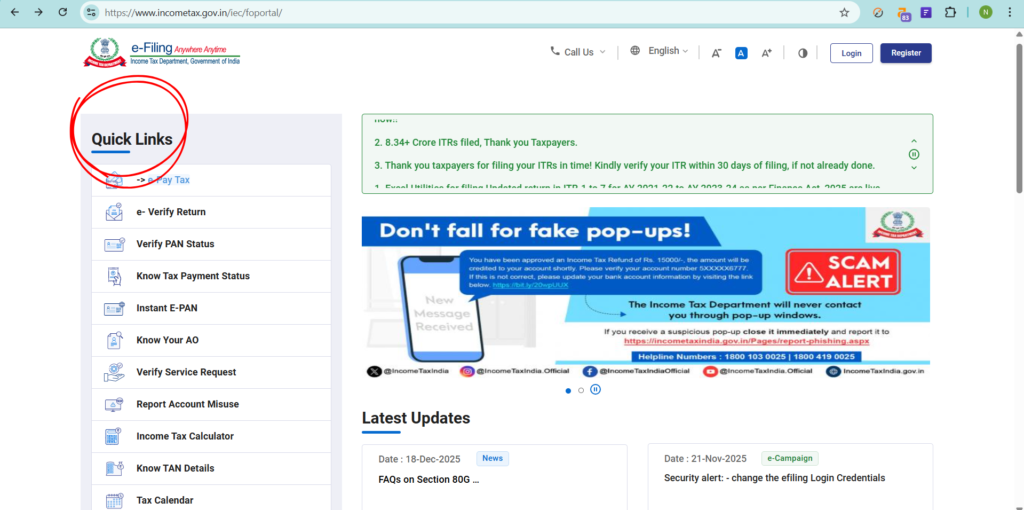
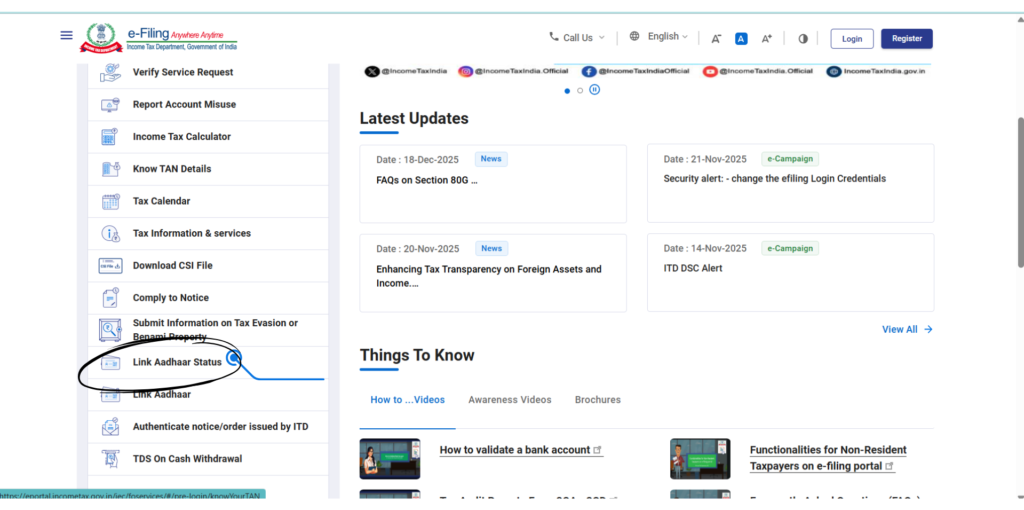
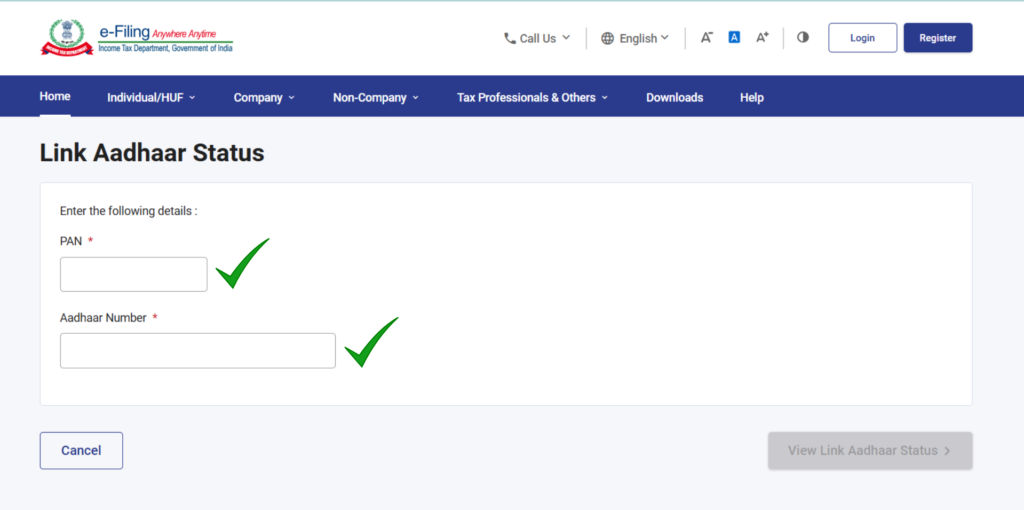
- Enter your Pan number and Aadhar number, then click View Status.
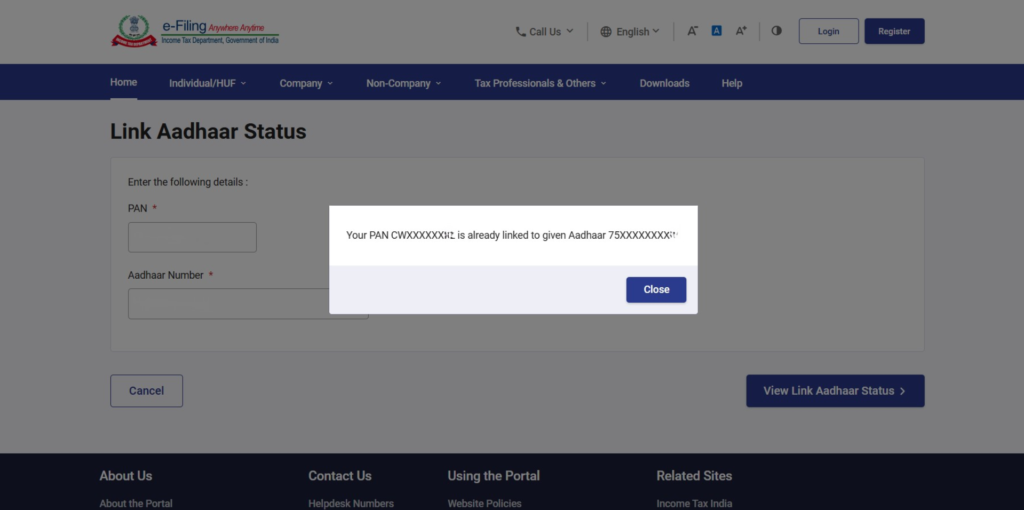
If it says “Already Linked”, your Pan is active.
If it says “Pan Not Linked With Aadhaar”, proceed to the next step.
Step 2: Open the Official Income Tax Website
Type “Income Tax India Portal” in your browser.
Make sure you are on the official .gov.in website to avoid scams.
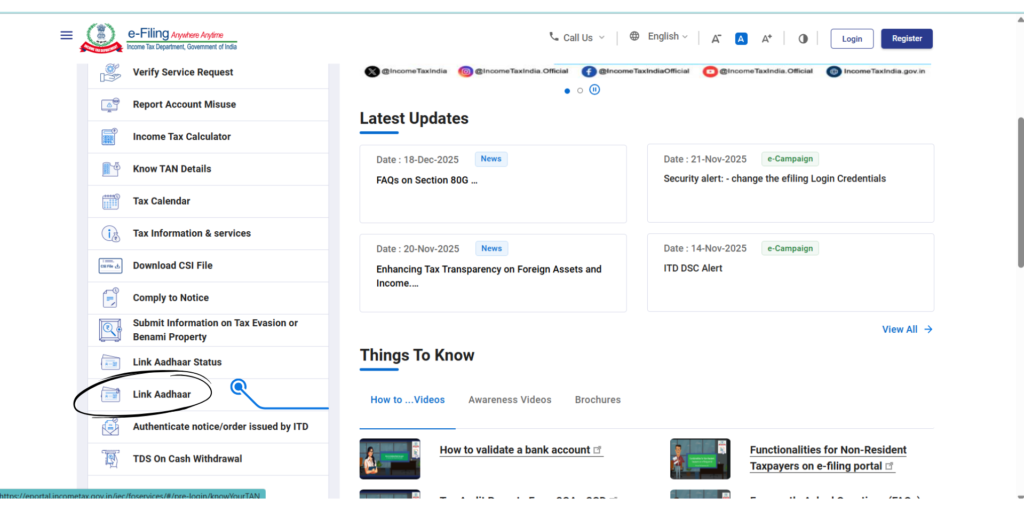
On the homepage, find Quick Links → Link Aadhaar.
Step 3: Enter Pan & Aadhar Details
Click Link Aadhaar.
Enter your Pan number and Aadhar number carefully.
Click Validate.
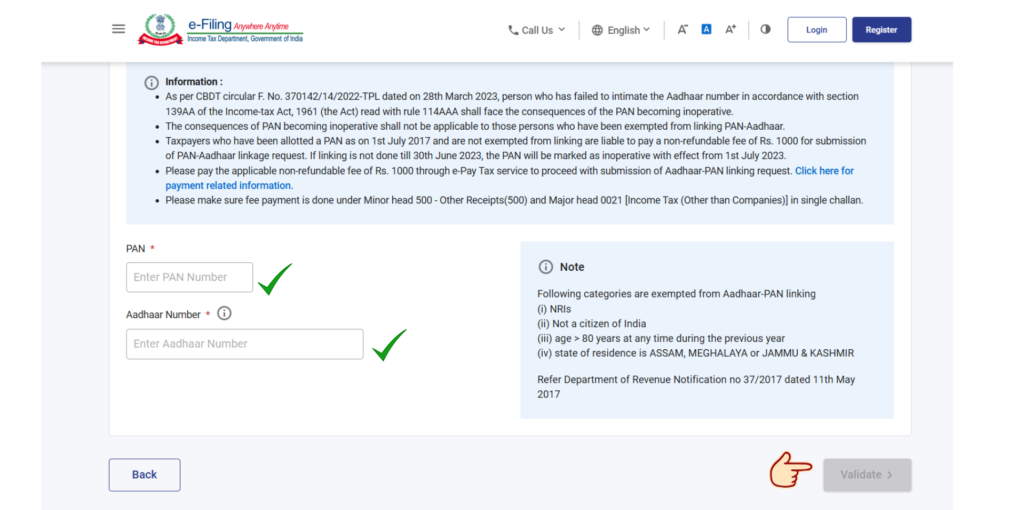
Tip: Make sure your name on Pan matches exactly with Aadhar. If there’s a mismatch, your linking may fail.
Step 4: Handle Delay Fee (₹1000) if Required
If you see “Payment Detail Not Found for this PAN”, it means delay fee is not paid.
Click Continue to Pay via e-Pay Tax.
Enter Pan & mobile number, then click Continue.
Enter OTP received on your mobile for verification.
Step 4a: Make Payment
Select Other Category → Delayed Fee → Fee for Delay in Linking PAN with Aadhaar.
System will automatically calculate ₹1000.
Pay via Debit Card, Credit Card, Netbanking, UPI.
Enter OTP from your bank to confirm payment.
Download the Challan for your records.
Step 5: Complete Linking After Payment
Wait 2–3 hours after payment for system updates.
Go back to Link Aadhaar, enter your Pan & Aadhar, and validate again.
BSR Code from challan will auto-populate.
Step 6: Enter Name & Mobile Number
Enter your name exactly as in Aadhar.
Enter your mobile number to receive OTP.
Tick “I Agree to Validate My Aadhaar Detail”.
If Aadhar has only birth year, select “I have only Year of Birth in Aadhar”.
Step 7: OTP Verification
Enter the OTP received on your mobile and click Validate.
Once verified, your request is submitted successfully.
Step 8: Check Link Status Again
After 30 minutes, go to Link Aadhaar Status, enter Pan & Aadhar, and check.
If successful, screen will show “Already Linked”.
PAN Aadhaar Link Fees & Charges in 2026
If you miss the deadline to link your PAN with Aadhaar, you can still do it later, but you will have to pay a ₹1,000 penalty.
Benefits of Linking Pan & Aadhar
Pan remains active.
Easy bank transactions.
Hassle-free ITR filing.
Avoid government penalties.
Conclusion
Linking your Pan with Aadhar is now mandatory in 2026. Follow this guide carefully and complete the process online. Don’t wait until the last day—link your Pan today to stay safe and keep all your financial transactions smooth.
FAQ's
1 Is it mandatory to link Pan Card with Aadhar in 2026?
Yes, linking Pan with Aadhar is mandatory in 2026. If your Pan is not linked, it may become inactive, which means you won’t be able to file ITR, open bank accounts, or do high-value financial transactions. To avoid any problems, you should complete the linking process as soon as possible.
2 What happens if my Pan Card is not linked with Aadhar?
If Pan is not linked with Aadhar, it becomes inoperative. An inoperative Pan cannot be used for income tax filing, bank transactions, investments, or verification purposes. You may also face higher TDS deductions on certain transactions.
3 How much is the Pan-Aadhar linking fee in 2026?
If you are linking Pan with Aadhar after the due date, you need to pay a delay fee of ₹1000. This amount is automatically calculated on the Income Tax portal while making the payment through e-Pay Tax.
4 How long does it take to link Pan with Aadhar after payment?
After successful payment of the delay fee, the system usually updates within 2 to 3 hours. In some cases, it may take up to 24 hours. Once updated, you can complete the linking process by verifying OTP on the Income Tax portal.
5 What should I do if OTP is not received while linking Pan and Aadhar?
If OTP is not received:
Check if your mobile number is linked with Aadhar
Wait for a few minutes and click Resend OTP
Ensure good network connectivity
If the issue continues, try again after some time or update your mobile number in Aadhar.
6 Can I link Pan with Aadhar without paying the fee?
No. If your Pan was not linked before the deadline, payment of ₹1000 delay fee is compulsory. Without completing the payment, the linking process will not be successful.
7 What if my name on Pan and Aadhar does not match?
If there is a name mismatch between Pan and Aadhar, linking may fail. In such cases, you should:
Correct the name in Pan or Aadhar first
Make sure spelling, initials, and order of name are the same
After correction, you can retry the linking process.
8 Can I link Pan and Aadhar using my mobile phone?
Yes, Pan-Aadhar linking can be done easily using a mobile phone. The Income Tax website is mobile-friendly, and you can complete the entire process including payment and OTP verification from your smartphone.
9 How can I check if my Pan is already linked with Aadhar?
You can check the status by visiting the Income Tax portal and clicking on Link Aadhaar Status. Enter your Pan number and Aadhar number, then click View Status. If linked, it will show “Already Linked”.
10 Is Pan automatically linked if it was created using Aadhar?
Yes, in most cases, Pan cards generated using Aadhar are already linked. However, it is always recommended to check the link status once to avoid future issues.
11 Can I file ITR if my Pan is not linked with Aadhar?
No. You cannot file your Income Tax Return if your Pan is inoperative due to non-linking with Aadhar. Linking Pan with Aadhar is mandatory for successful ITR filing.
12 Is it safe to link Pan and Aadhar online?
Yes, linking Pan and Aadhar through the official Income Tax portal is completely safe and secure. Always avoid third-party websites and use only the government portal.
13 What documents are required for Pan-Aadhar linking?
You only need:
Pan number
Aadhar number
Mobile number linked with Aadhar
No physical documents are required.
14 Will my Pan become active again after linking with Aadhar?
Yes. Once Pan is successfully linked with Aadhar, your Pan becomes active again, and you can use it for all financial and tax-related activities.
15 How many times can I try Pan-Aadhar linking if it fails?
You can try linking multiple times until it is successful. Make sure that details entered are correct and payment is completed properly before retrying.
16 Who needs to link Aadhaar with PAN?
If you have a PAN card and you are eligible for Aadhaar, you must link your Aadhaar with PAN.
If Aadhaar is not linked, your PAN becomes inoperative (not valid).
This rule applies from 1 July 2023.
Some people are exempted, so this rule does not apply to them.
17 Who does NOT need to link Aadhaar with PAN?
Aadhaar–PAN linking is not compulsory for:
People living in Assam, Jammu & Kashmir, or Meghalaya
Non-Residents (NRIs) as per Income Tax Act
Individuals aged 80 years or above
Foreign citizens (not Indian citizens)
Note:
If anyone from the above category wants to link Aadhaar voluntarily, they must pay the applicable fee.
18 How can I link Aadhaar with PAN?
You can link Aadhaar and PAN online through the Income Tax e-Filing portal.
Login is not mandatory
Use the “Link Aadhaar” option available on the home page
Follow simple steps and complete linking
19 What happens if Aadhaar is not linked with PAN?
If Aadhaar is not linked, your PAN becomes inoperative, and:
You will not get income tax refunds
No interest will be paid on pending refunds
Higher TDS will be deducted on income
Higher TCS may be collected
In short, many tax-related problems can occur.
20 What if my Aadhaar and PAN details do not match?
If your name, date of birth, or mobile number is different in Aadhaar and PAN:
Update details in PAN via NSDL or UTIITSL
Update details in Aadhaar through UIDAI portal
If online linking still fails, you can visit PAN service centers for biometric verification with:
PAN card
Aadhaar card
₹1000 fee challan
21 How to activate PAN if it becomes inoperative?
If your PAN is already inoperative:
Pay a ₹1000 penalty
Link Aadhaar with PAN
PAN will become active again
The penalty will continue to apply until PAN is activated.
Get Help for Pan–Aadhar Linking
Still confused about Pan–Aadhar linking?
If you are facing issues like OTP not coming, name mismatch, or payment problems, get expert help now. Our team will guide you step by step and ensure your Pan is linked correctly without stress.
📞 Call +91-9266685656

CharteredHelp is a team of experienced professionals providing tax, accounting, auditing, and compliance services for businesses and individuals. With over 10+ years of experience, we assist clients with GST registration and filings, income tax returns, company registration, trademark services, accounting, auditing, and handling tax notices. Our focus is on providing practical, reliable, and timely support to help clients stay compliant and grow their businesses with confidence.